
Search result
Auto surround playback
Description of sound mode types
Dolby sound mode
|
Sound mode type |
Description |
|---|---|
|
Dolby PL |
This mode can be selected when the Dolby PL |
|
Dolby Digital |
This mode can be selected when playing sources recorded in Dolby Digital. |
|
Dolby TrueHD |
This mode can be selected when playing sources recorded in Dolby TrueHD. |
|
Dolby Digital Plus |
This mode can be selected when playing sources recorded in Dolby Digital Plus. |

DTS sound mode
|
Sound mode type |
Description |
|---|---|
|
DTS Neo:6 |
This mode can be selected when a DTS Neo:6 decoder is used to play back 2-channel source in 5.1-channel surround sound. |
|
DTS Surround |
This mode can be selected when playing sources recorded in DTS. |
|
DTS-HD |
This mode can be selected when playing sources recorded in DTS-HD. |
PCM multi-channel sound mode
|
Sound mode type |
Description |
|---|---|
|
Multi Ch In |
This mode can be selected when playing multi-channel PCM sources. |
Original sound mode
|
Sound mode type |
Description |
|---|---|
|
Multi Ch Stereo |
This mode is for enjoying stereo sound from all speakers. |
|
Virtual |
This mode lets you experience an expansive surround sound effect when playing back through just the front (L/R) speakers only, and when listening with stereo headphones. |
Stereo sound mode
|
Sound mode type |
Description |
|---|---|
|
Stereo |
This mode plays 2-channel stereo audio with no additional surround sound processing. Sound is output from the front left and right speakers, and subwoofer if connected. When multi-channel signals are inputted, they are mixed down to 2-channel audio and are played back with no additional surround sound processing. |
Direct sound mode
|
Sound mode type |
Description |
|---|---|
|
Direct |
This mode plays back audio as recorded in the source. |
|
Pure Direct |
This mode plays back an even higher quality sound than the “Direct” mode. Display indicator circuit of the main body (display will go off.) |
NOTE
When the Pure Direct mode has been selected, the display turns off after about 5 seconds.
Views on the display
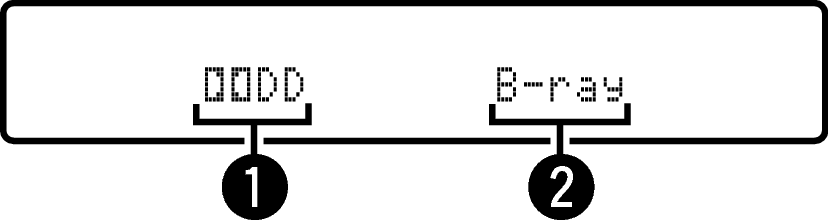
Shows a decoder to be used.
In the case of the Dolby Digital decoder, “  ” is displayed.
In the case of the Dolby Digital Plus decoder, “  ” is displayed.