
Search result
Front panel
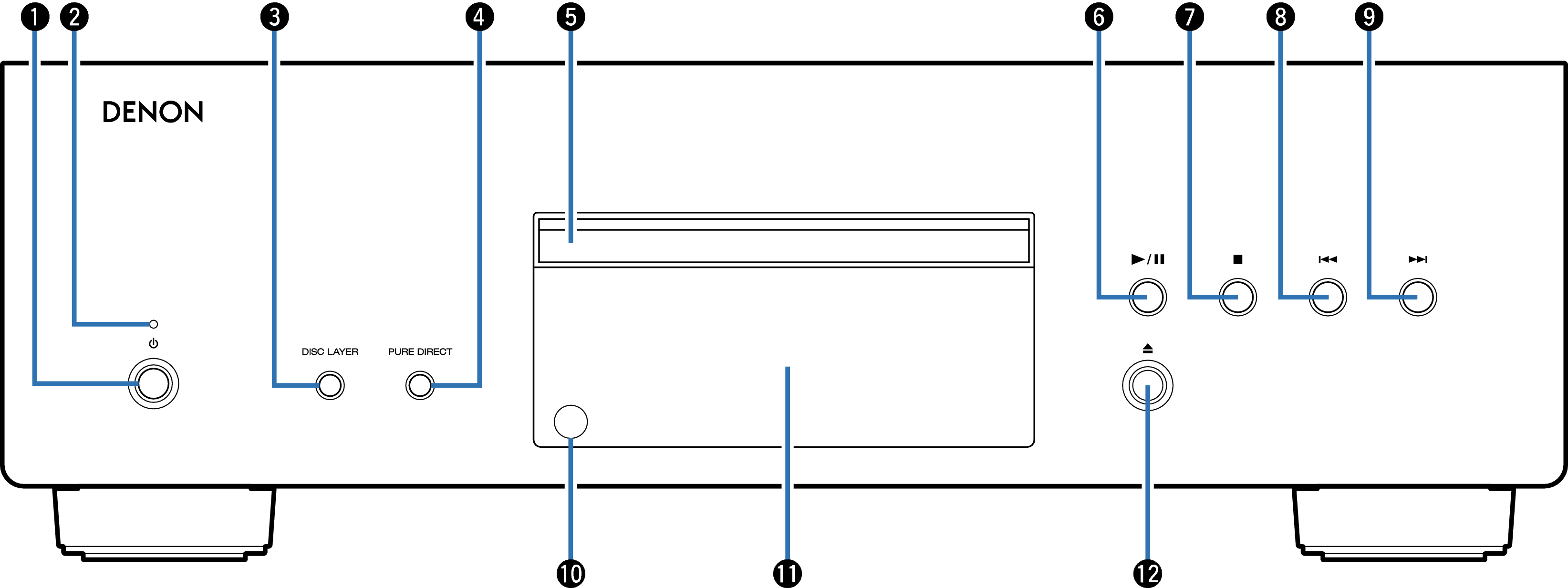
Power operation button (  )
)
Turns power to this unit on and off. link
Power indicator
This is lit as follows according to the power status:
Power on : Green
Standby : Off
Power off : Off
DISC LAYER button
This switches the Super Audio CD layer.link
PURE DIRECT button
This switches the Pure Direct mode.link
Disc tray
Used to insert a disc.
Play/pause button (  /
/  )
)
Plays the track/Pauses the track.
Stop button (  )
)
Stops playback.
Reverse-skip button (  )
)
Returns to the start of the currently playing track.
Forward-skip button (  )
)
Plays the next track.
Remote control sensor
This receives signals from the remote control unit. link
Display
This displays various pieces of information. link
Disc tray open/close button (  )
)
Opens and closes the disc tray.