
Search result
Playing files
Load a CD-R/-RW or DVD-R/-RW/+R/+RW disc containing music files into the disc tray. link
Press  on the main unit to open/close the disc tray.
Use 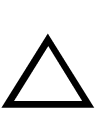

 to select the folder to be played, then press ENTER.
to select the folder to be played, then press ENTER.Use to select the file to be played, then press ENTER.
to select the file to be played, then press ENTER.Playback starts.
|
Operation buttons |
Function |
|
|
Playback / Pause |
|
|
Stop |
|
|
Skip to previous track / Skip to next track |
|
|
Fast-reverse / Fast-forward |
|
|
Moving up a level in the folder tree |
|
|
Select the item |
|
ENTER |
Enter the selected item / Playback |
|
MODE |
Select the playback range |
|
RANDOM |
Random playback |
|
REPEAT |
Repeat playback Switching between All-track repeat, Single-track repeat and Repeat off. |
|
INFO |
Switch the display between the album name and the file format |
 /
/ 


To play another file while playing from a CD-R/-RW or DVD-R/-RW/+R/+RW, press to display the folder tree, to select the file to be played, and then press ENTER.
Switching the display
During playback, press INFO.
Switch the display between the album name and the file format.
If a file does not support text information or no track information is recorded, the file name is displayed.
Any characters that cannot be displayed are replaced with “.” (period).
Files that can be played back
See “Playable files”. link
Switching the playback range
In the stop mode, press MODE.
The playback range of a track can be set.
|
Folder playback mode: |
All the files in the selected folder are played. |
|
All playback mode: |
All the files in the disc are played. |
 is displayed on the display at this time.
The folder hierarchy is not displayed when “All playback mode” is set as the playback range.