
Search result
Front panel
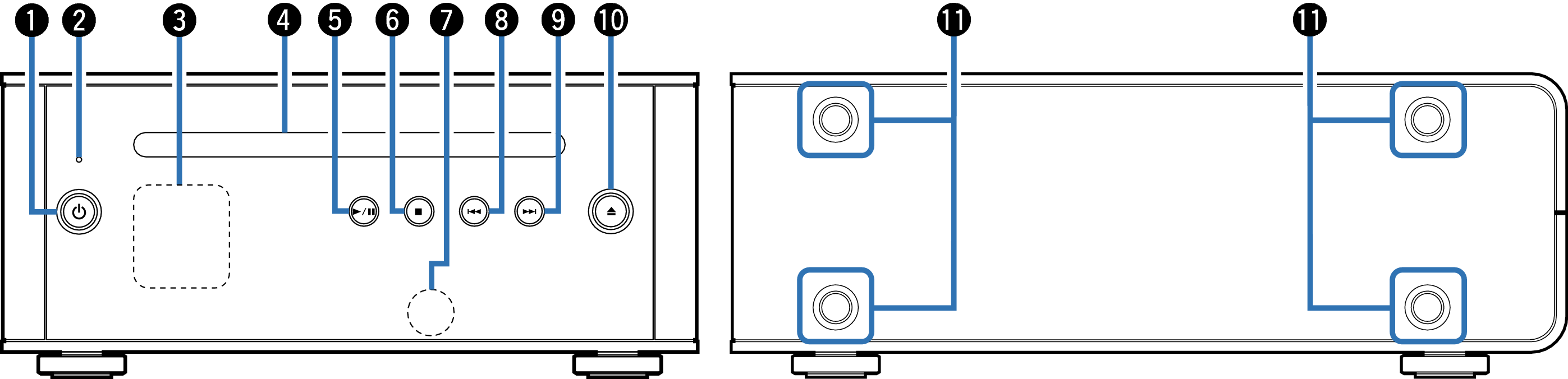
Power operation button (  )
)
This turns the power on/to standby. link
The power status is indicated as follows.
Power on: Display lit
Standby: Display off
Protection circuit indicator
This blinks when the protection circuit has operated. link
Display
This displays various pieces of information. link
CD slot link
Play/pause button (  /
/  )
)
Plays the track/Pauses the track.
Stop button (  )
)
Stops playback.
Remote control sensor
This receives signals from the remote control unit. link
Reverse-skip button (  )
)
Returns to the start of the currently playing track.
Forward-skip button (  )
)
Plays the next track.
CD Eject button (  )
)
Ejects the disc.
Installation holes for vertical installation feet
These are used when the unit is installed vertically. link