logo
Contents

Overview

Introduction
Before your begin

Setup

Setting up your first HEOS speaker
Adding more HEOS devices

Use

Using your HEOS speaker
Making speaker adjustments
Updating your system
Advanced features
Power management
Setting up HEOS 1 Go Pack
Connecting the battery
Charging the battery
Connecting the Splashguard
Close splashguard
Turning off/on the battery

Troubleshooting

Basic troubleshooting

Status LED

Status LED table

Appendix

Supported file types and codecs
Specifications
Information
PDF Download

  • Top
  • Use
  • Setting up HEOS 1 Go Pack

Overview

Introduction
Before your begin

Setup

Setting up your first HEOS speaker
Adding more HEOS devices

Use

Using your HEOS speaker
Making speaker adjustments
Updating your system
Advanced features
Power management
Setting up HEOS 1 Go Pack
Connecting the battery
Charging the battery
Connecting the Splashguard
Close splashguard
Turning off/on the battery

Troubleshooting

Basic troubleshooting

Status LED

Status LED table

Appendix

Supported file types and codecs
Specifications
Information

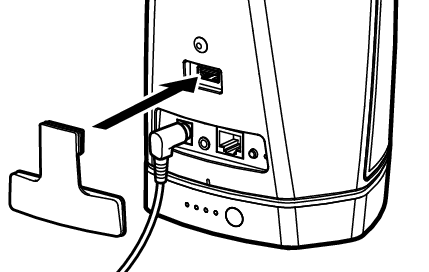
Connecting the Splashguard

Once your battery is fully charged, attach the Splashguard to the back of the speaker.

HEOS1 HS2 attach dongle small 01

Playing music from the AUX inputlink

Playing music from a USB devicelink

Playing music from Bluetooth devicelink

Using your HEOS speaker
Making speaker adjustments
Updating your system
Advanced features
Power management
Setting up HEOS 1 Go Pack
Connecting the battery
Charging the battery
Connecting the Splashguard
Close splashguard
Turning off/on the battery

back to top

WIIRELESS SPEAKER, BATTERY FOR HEOS 1
Copyright © 2016 D&M Holdings Inc. All Rights Reserved.