
Note 2: AVR check item
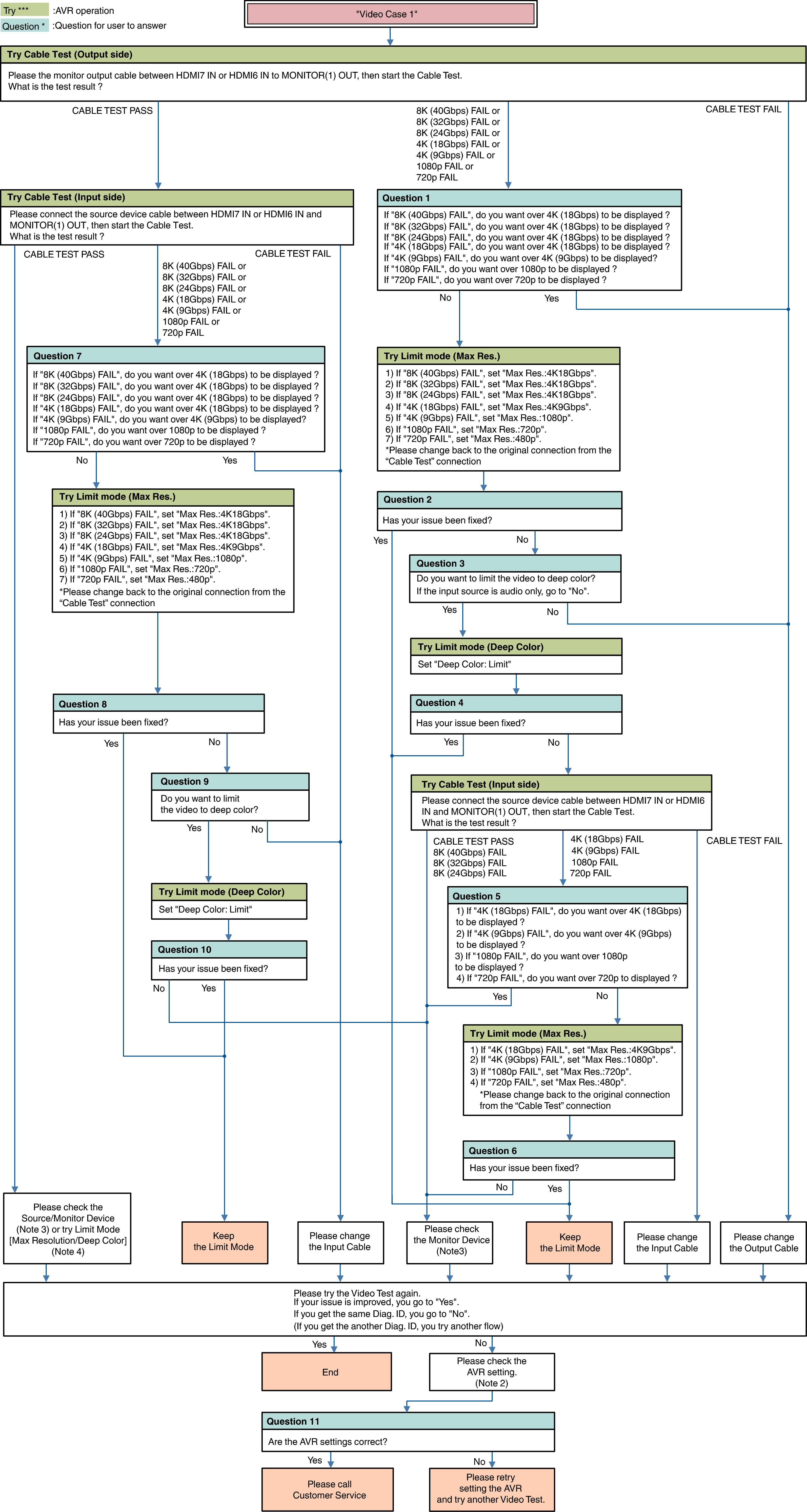
Other Video Case1
Menu Setting
Video  HDMI Setup HDMI Audio Out
Video 4K/8K Signal Format
Video Output Settings HDMI Video Output
Video Output Settings HDMI Upscaler
Video TV Format
Inputs Input Assign
Connection [Source device / AVR / Monitor device]
Note3: Monitor Device check item
(Try) AC Off/On
(Try) Standby/Power On
(Check or change) HDCP Ver. setting
(Check or change) EDID (4K/8K Limitation) setting
(Check or change) limit of each HDMI input terminal
Video check (connect the HDMI cable from Source device to the Monitor directly without AVR.)
Note 4: Try Limit Mode
Max Resolution setting
Set a lower resolution
NoLimit 4K18Gbps 4K9Gbps 1080p 720p 480p
Deep Color setting
Set a “Limit”