
Description “V1-02”: Cannot detect the HDMI signal from the source device at the AVR input terminal (as TMDS Rx PLL UnLock).
Video Flow V1-02/06/10
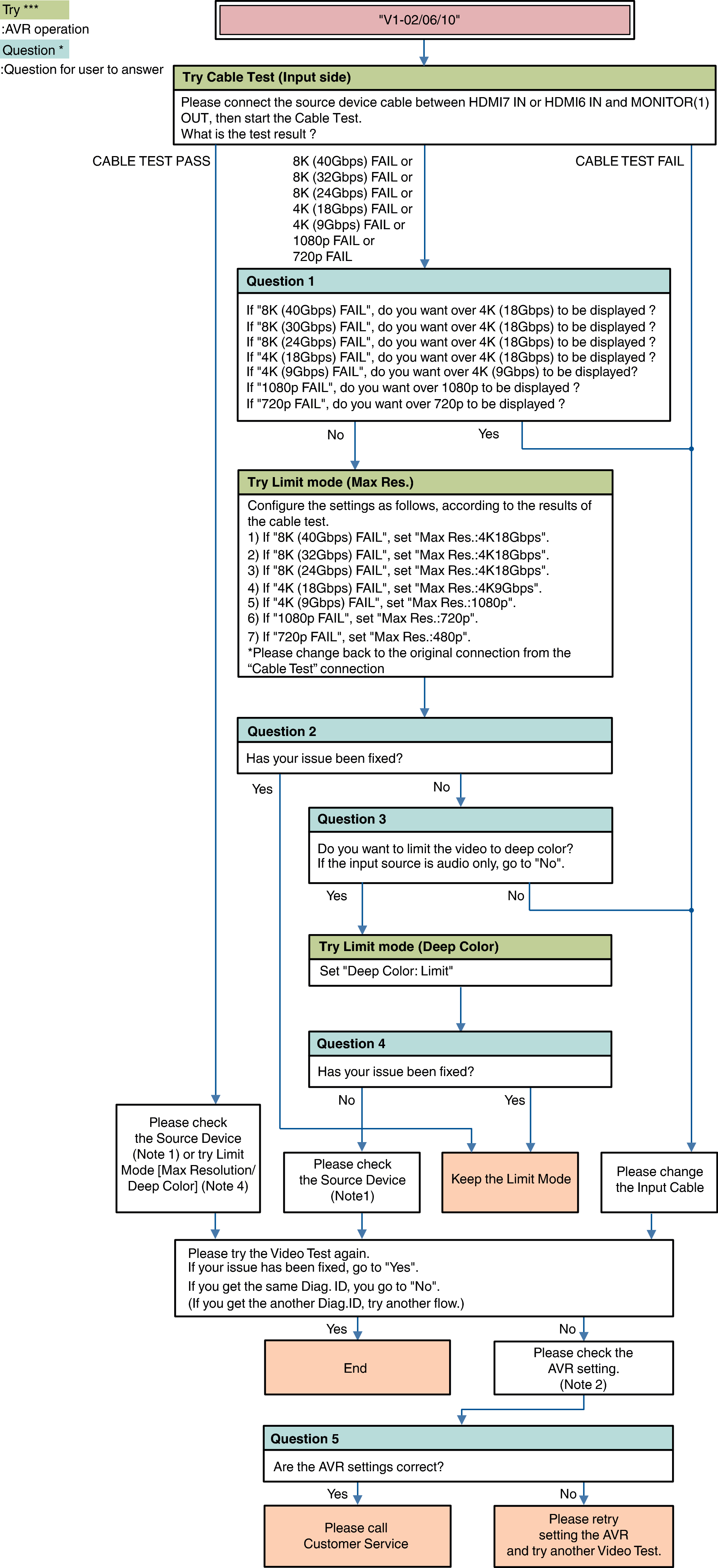
Description “V1-06”: Copyright Protection certification Error with Source Device. (HDCP Error).
Description “V1-10”: Quality of HDMI Signal(TMDS) is bad.
Note1: Source Device check item
(Try) AC Off/On
(Try) Standby/Power On
(Check or change) Video setting (Resolution, etc...)
(Check or change) Output Terminal setting (case of Dual output source device)
Video check (connect the HDMI cable from Source device to the Monitor directly without the AVR.)
Note 2: AVR check item
Menu Setting
Video  HDMI Setup HDMI Audio Out
Video 4K/8K Signal Format
Video Output Settings HDMI Video Output
Video Output Settings HDMI Upscaler
Video TV Format
Inputs Input Assign
Connection [Source device / AVR / Monitor device]
Note 4: Try Limit Mode
Max Resolution setting
Set a lower resolution
NoLimit 4K18Gbps 4K9Gbps 1080p 720p 480p
Deep Color setting
Set a “Limit”