
logo
Contents

Overview

Accessories
Features
Part names and functions

Connections

Connections
Speaker installation
Connecting speakers
Connecting a TV
Connecting a playback device
Connecting a USB memory device to the USB port
Connecting FM/AM antennas (for FM/AM model only)
Connecting a DAB/FM antenna (for FM/DAB model only)
Connecting to a home network (LAN)
Wired LAN
Wireless LAN
Connecting the power cord

Playback

Basic operation
Playing a USB memory device
Listening to music on a Bluetooth device
Listening to audio on Bluetooth headphones
Listening to FM/AM broadcasts (for FM/AM model only)
Listening to FM/DAB broadcasts (for FM/DAB model only)
Listening to Internet Radio
Playing back files stored on a PC or NAS
Getting the HEOS App
AirPlay function
Spotify Connect function
Convenience functions
Selecting a sound mode
HDMI Control function
Smart Menu function
Sleep timer function
Quick select plus function
Panel lock function
Remote lock function
Web control function
Playback in ZONE2 (Another room)

Settings

Menu map
Audio
Video
Inputs
Speakers
Audyssey® Setup
Manual Setup
Network
HEOS Account
General
Limiting the operating zone with the remote control

Tips

Tips
Troubleshooting
Resetting factory settings
Resetting network settings
Restoring the firmware to the factory defaults

Appendix

About HDMI
Relationship between video signals and monitor output
Playing back a USB memory devices
Playing back a Bluetooth device
Playing back a file saved on a PC or NAS
Playing back Internet Radio
Personal memory plus function
Last function memory
Explanation of terms
Trademark information
Specifications
Dimensions / Weight
Index
PDF Download
Surround Parameter Table (English only)

Search result

There was no matching word.

  • Top
  • Connections
  • Connecting to a home network (LAN)

Overview

Accessories
Features
Part names and functions

Connections

Connections
Speaker installation
Connecting speakers
Connecting a TV
Connecting a playback device
Connecting a USB memory device to the USB port
Connecting FM/AM antennas (for FM/AM model only)
Connecting a DAB/FM antenna (for FM/DAB model only)
Connecting to a home network (LAN)
Wired LAN
Wireless LAN
Connecting the power cord

Playback

Basic operation
Playing a USB memory device
Listening to music on a Bluetooth device
Listening to audio on Bluetooth headphones
Listening to FM/AM broadcasts (for FM/AM model only)
Listening to FM/DAB broadcasts (for FM/DAB model only)
Listening to Internet Radio
Playing back files stored on a PC or NAS
Getting the HEOS App
AirPlay function
Spotify Connect function
Convenience functions
Selecting a sound mode
HDMI Control function
Smart Menu function
Sleep timer function
Quick select plus function
Panel lock function
Remote lock function
Web control function
Playback in ZONE2 (Another room)

Settings

Menu map
Audio
Video
Inputs
Speakers
Audyssey® Setup
Manual Setup
Network
HEOS Account
General
Limiting the operating zone with the remote control

Tips

Tips
Troubleshooting
Resetting factory settings
Resetting network settings
Restoring the firmware to the factory defaults

Appendix

About HDMI
Relationship between video signals and monitor output
Playing back a USB memory devices
Playing back a Bluetooth device
Playing back a file saved on a PC or NAS
Playing back Internet Radio
Personal memory plus function
Last function memory
Explanation of terms
Trademark information
Specifications
Dimensions / Weight
Index

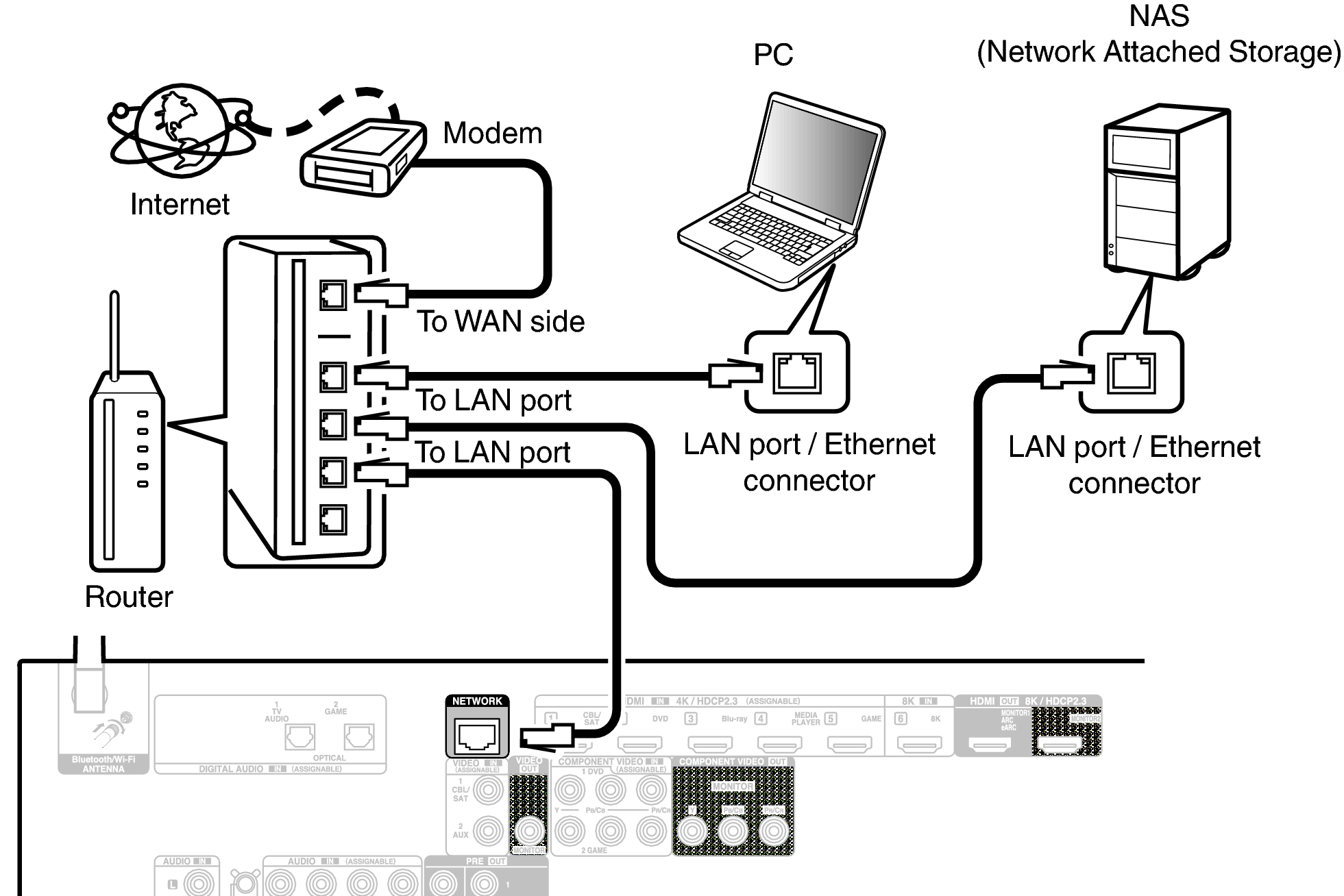
Wired LAN

To make connections via wired LAN, use a LAN cable to connect the router to this unit as shown in the figure below.
Conne LAN X27E2
Connections
Speaker installation
Connecting speakers
Connecting a TV
Connecting a playback device
Connecting a USB memory device to the USB port
Connecting FM/AM antennas (for FM/AM model only)
Connecting a DAB/FM antenna (for FM/DAB model only)
Connecting to a home network (LAN)
Wired LAN
Wireless LAN
Connecting the power cord

back to top

INTEGRATED NETWORK AV RECEIVER
© 2020 Sound United. All Rights Reserved.