
Search result
Connecting an external power amplifier
You can use this unit as a preamplifier by connecting an external power amplifier to the PRE OUT connectors. By adding a power amplifier to each channel, the realness of the sound can be further enhanced.
Select the terminal to use and connect the device.
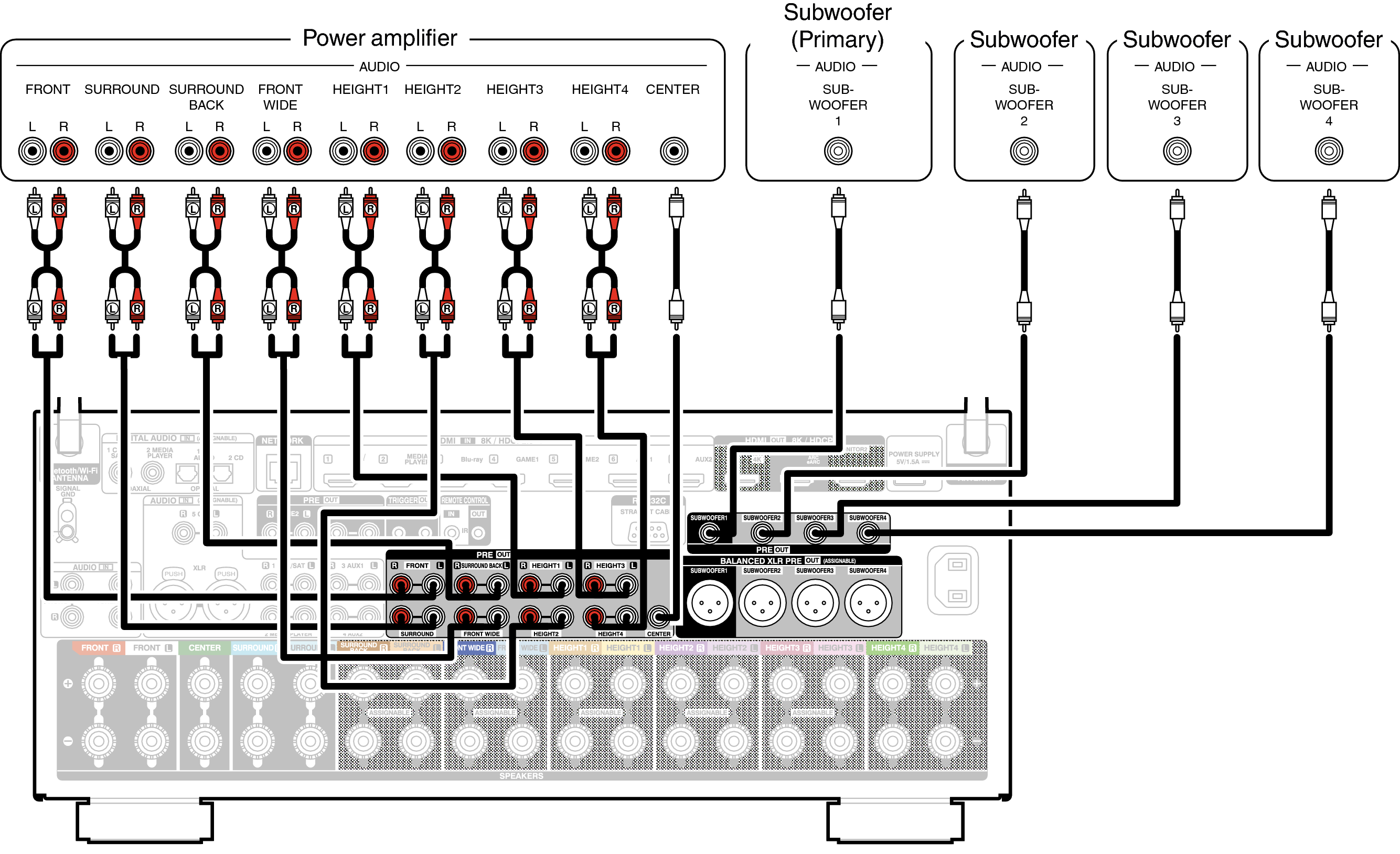
If you connect an external power amplifier to all speakers and use this unit as a preamplifier, set “Amp Assign” to “Preamplifier”. link
Interference to the preamplifier can be reduced by turning off the signal path to the power amplifier.
If you set “Connection” in the menu, the signal path to the power amplifier of each channel is able to be individually turned off and you can use your favorite channel as a preamplifier. link
When using just one surround back speaker, connect it to the left channel (L) terminal.
The output signal for the PRE OUT connector of Height 1, Height 2, Height 3, and Height 4 vary depending on the combination of the Height/Ceiling/Dolby Atmos Enabled speakers that you are using. For the PRE OUT connector that connects each Height/Ceiling/Dolby Atmos Enabled speaker, refer to “Speaker Layout” - “Layout” or “Front Layout / Middle Layout / Rear Layout / TS/CH”link.
You can connect to the subwoofer with either an RCA connection or the XLR terminal.
The XLR terminal of the subwoofer can be used as a speaker other than a subwoofer such as the Front Left, Front Right, or Center channel. To use it as a speaker, assign it to a channel of your choice in “XLR Output Assign”. link
 AVC-A1H BALANCED XLR PRE OUT connector PIN arrangement

GND (Ground)
HOT (+)
COLD (–)
The PIN arrangement in this unit uses the European method.
In the USA method,  is COLD, and
  is HOT.
When connecting a device that utilizes the USA type of PIN arrangement, replace the and plugs on one side of the balanced cable.
NOTE
Do not short the HOT and GND or COLD and GND for use.
Disconnect this unit’s power plug from the power outlet before connecting the speakers.
Also, turn off the power amp and subwoofer.