logo
Contents

Overview

Accessories

Inserting the batteries
Operating range of the remote control unit
Features

High quality sound
High performance
Easy operation
Part names and functions

Front panel
Display
Rear panel
Remote control unit

Connections

Connections
Connecting speakers

Speaker installation
Speaker connection
Standard speaker configuration and connection
Connecting a TV

Connection 1 : TV equipped with an HDMI connector and compatible with the ARC (Audio Return Channel)
Connection 2 : TV equipped with an HDMI connector and incompatible with the ARC (Audio Return Channel)
Connection 3 : TV equipped without an HDMI connector
Connecting a playback device

Connecting a set-top box (Satellite tuner/cable TV)
Connecting a DVD player or Blu-ray Disc player
Connecting a game console or video camcorder
Connecting an FM/AM antenna
Connecting the power cord

Playback

Basic operation

Turning the power on
Selecting the input source
Adjusting the volume
Turning off the sound temporarily (Muting)
Playback a DVD player/Blu-ray Disc player
Listening to music on a Bluetooth device

Playing music from Bluetooth device
Pairing with other Bluetooth devices
Reconnecting to this unit from a Bluetooth device
Listening to FM/AM broadcasts

Listening to FM/AM broadcasts
Tuning in to stations and presetting them automatically (Auto Preset)
Presetting the current broadcast station (Preset Memory)
Listening to preset stations
Skipping preset broadcast stations (Preset Skip)
Cancelling Preset Skip
Convenience functions

Performing repeat playback (Repeat)
Performing random playback (Random)
Adjusting the tone (Tone)
Optimizing the night time listening volume (Night Mode)
Displaying your desired video during audio playback (Video Select)
Selecting a sound mode

Selecting a sound mode
Auto surround playback
HDMI control function

Setting procedure
Adjusting the volume of each channel to match the input source (Ch Level Adjust)
Sleep timer function

Using the sleep timer
Quick select plus function

Calling up the settings
Changing the settings

Settings

Menu map

Menu operations
Audio

Surr.Parameter
Restorer
Audio Delay
Volume
Video

HDMI Audio Out
HDMI PassThrough
Pass Source
HDMI Control
ARC
TV Audio Switching
Pow.Off Control
Inputs

Input Assign
Source Level
Input Select
Speakers

Speaker Config.
Distances
Levels
Crossovers
Bass
General

Language
ECO
Bluetooth
Front Display
Setup Lock
Reset
Checking the information

Tips

Contents

Tips
Troubleshooting
Resetting factory settings

Appendix

About HDMI
Playing back a Bluetooth device
Personal memory plus function
Last function memory
Sound modes and channel output
Sound modes and surround parameters
Types of input signals, and corresponding sound modes
Explanation of terms
Trademark information
Specifications
Dimensions / Weight
Index
PDF Download

Search result

There was no matching word.

  • Top
  • Playback

Overview

Accessories

Inserting the batteries
Operating range of the remote control unit
Features

High quality sound
High performance
Easy operation
Part names and functions

Front panel
Display
Rear panel
Remote control unit

Connections

Connections
Connecting speakers

Speaker installation
Speaker connection
Standard speaker configuration and connection
Connecting a TV

Connection 1 : TV equipped with an HDMI connector and compatible with the ARC (Audio Return Channel)
Connection 2 : TV equipped with an HDMI connector and incompatible with the ARC (Audio Return Channel)
Connection 3 : TV equipped without an HDMI connector
Connecting a playback device

Connecting a set-top box (Satellite tuner/cable TV)
Connecting a DVD player or Blu-ray Disc player
Connecting a game console or video camcorder
Connecting an FM/AM antenna
Connecting the power cord

Playback

Basic operation

Turning the power on
Selecting the input source
Adjusting the volume
Turning off the sound temporarily (Muting)
Playback a DVD player/Blu-ray Disc player
Listening to music on a Bluetooth device

Playing music from Bluetooth device
Pairing with other Bluetooth devices
Reconnecting to this unit from a Bluetooth device
Listening to FM/AM broadcasts

Listening to FM/AM broadcasts
Tuning in to stations and presetting them automatically (Auto Preset)
Presetting the current broadcast station (Preset Memory)
Listening to preset stations
Skipping preset broadcast stations (Preset Skip)
Cancelling Preset Skip
Convenience functions

Performing repeat playback (Repeat)
Performing random playback (Random)
Adjusting the tone (Tone)
Optimizing the night time listening volume (Night Mode)
Displaying your desired video during audio playback (Video Select)
Selecting a sound mode

Selecting a sound mode
Auto surround playback
HDMI control function

Setting procedure
Adjusting the volume of each channel to match the input source (Ch Level Adjust)
Sleep timer function

Using the sleep timer
Quick select plus function

Calling up the settings
Changing the settings

Settings

Menu map

Menu operations
Audio

Surr.Parameter
Restorer
Audio Delay
Volume
Video

HDMI Audio Out
HDMI PassThrough
Pass Source
HDMI Control
ARC
TV Audio Switching
Pow.Off Control
Inputs

Input Assign
Source Level
Input Select
Speakers

Speaker Config.
Distances
Levels
Crossovers
Bass
General

Language
ECO
Bluetooth
Front Display
Setup Lock
Reset
Checking the information

Tips

Contents

Tips
Troubleshooting
Resetting factory settings

Appendix

About HDMI
Playing back a Bluetooth device
Personal memory plus function
Last function memory
Sound modes and channel output
Sound modes and surround parameters
Types of input signals, and corresponding sound modes
Explanation of terms
Trademark information
Specifications
Dimensions / Weight
Index
PDF Download

Basic operation

Remote control unit illustration
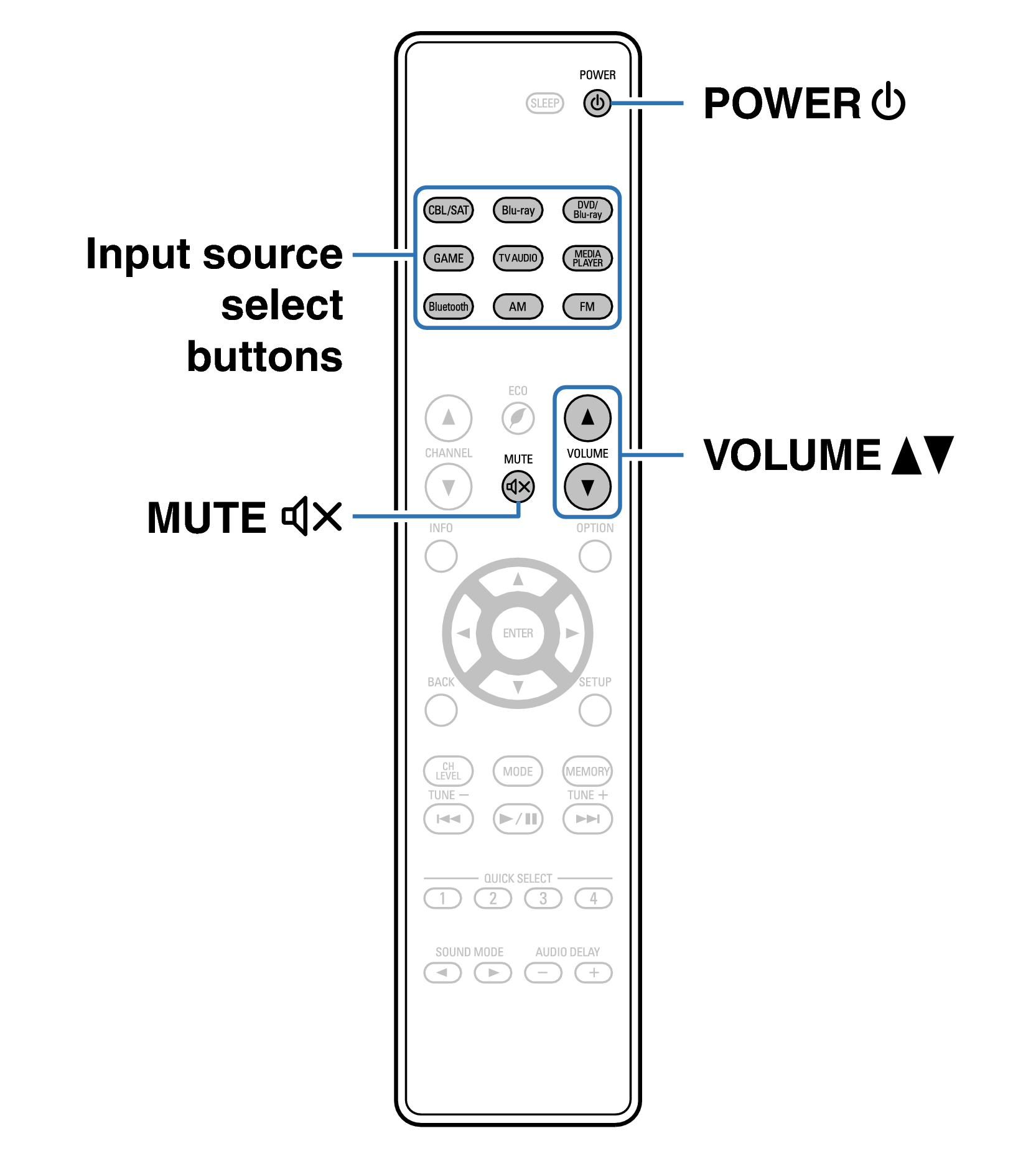
Ope Basic RC1225
Turning the power on
Selecting the input source
Adjusting the volume
Turning off the sound temporarily (Muting)
Playback a DVD player/Blu-ray Disc player

back to top

AV SURROUND RECEIVER