
Setting the Active Noise Cancelling mode or the Transparency mode
The earbuds can be matched to the used environment by setting the Active Noise Cancelling mode or the Transparency mode.
Active Noise Cancelling mode
If the Active Noise Cancelling mode is set when you are listening to music, the ambient noise is reduced so that you can focus better on the music. In addition, the Active Noise Cancelling function can be used on its own without playing music so that you can concentrate in quiet environments.
Transparency mode
When the Transparency mode is set when you are listening to music, ambient sounds are captured from the mic of this device and are mixed with the music you are listening to. The surrounding sounds can be heard even during music playback, so you can enjoy listening to music while checking the surrounding sounds.
Active Noise Cancelling mode automatically optimizes noise cancellation according to the environment in which your earbuds are used and how you wear them. Optimization may change the effectiveness of noise cancellation and the way you hear sounds.
Long press the touch sensor on the right or left earbud for approximately 2 seconds.
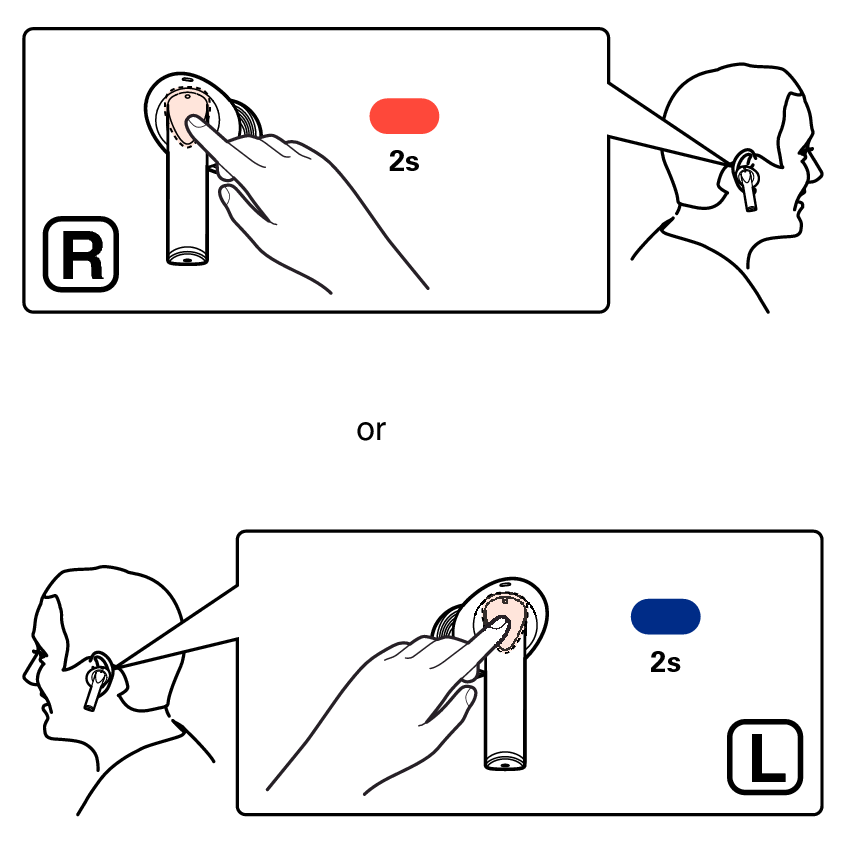
Each time you long press, a notification sound is heard, and the earbuds are switched to the next mode.
|
Mode |
Number of notification sounds |
|
|
Active Noise Cancelling mode |
Once |
|
|
Transparency mode |
Twice |
|
The Active Noise Cancelling mode can be turned off using the Denon Headphones app.