
Operating this unit by voice with the Siri function
This unit supports Siri, you can enjoy the ability to operate the unit and play music simply by speaking.
To use Siri, an Apple HomePod or Apple HomePod Mini must be connected to the same network as this unit.
Download the HEOS app in advance to your iOS device and then connect this unit to the network. link
Then enable Siri by setting the following in the HEOS app.
Enable Siri on Denon Home.
Perform set up through the HEOS app.
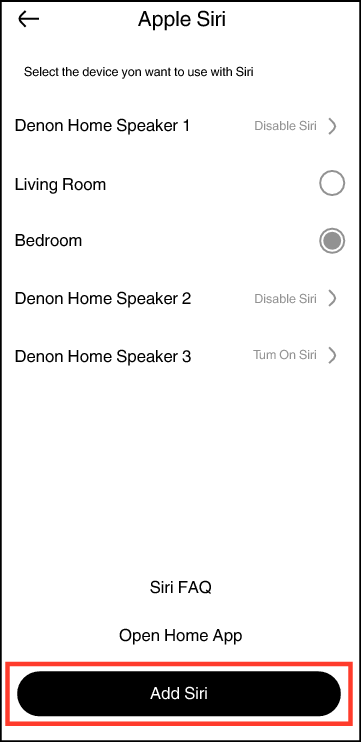
Go to: “Home” - “Settings” - “Voice Assistants” - “Apple Siri”
Select the Denon Home speaker you wish to add and tap “Add Siri”.
Instead of saying “Hey, Siri”, you can also press the  button on this unit to initiate voice control using Siri.
In order to prevent Siri from responding by mistake or to protect your privacy, slide the  switch on this unit to display in red. The microphone mute LED on the front of the unit will be red and the microphone is disabled. The button of this unit will also be disabled.
Examples of voice operation
For example, ask Siri the following:
Asking Siri a question: “How’s the weather today?”
Playing music: “Play the song xx”
Operating this unit: “Increase the volume”